Page 1 of 1
Displaying the drives menu (Alt+F1/F2)
Posted: 28.12.2024, 10:17
by ags1905
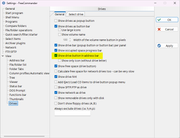
There is an option in Tools - Settings - Drives that is called "Show drive button in address bar" that shows the drives menu, the one displayed with keyboard shortcuts Ctrl + F1/F2. If the option is not checked, the well-known keyboard shortcut does not work.
The option:
It's effects:
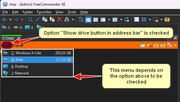
Please make it so that this important menu works and does not depend on that option.
Re: Displaying the drives menu (Ctrl+F1/F2)
Posted: 28.12.2024, 12:28
by Marek
The default shortcuts are Alt+F1, Alt+F2
The popup menu is showed always - independent the option "Show drive button in address bar".
Re: Displaying the drives menu (Alt+F1/F2)
Posted: 28.12.2024, 13:43
by ags1905
The default shortcuts are Alt+F1, Alt+F2
Ahh, Alt+F1! I knew that, I don't know why I wrote Ctrl, LOL
The popup menu is showed always
You're right, it works. Hm... I don't now what happened earlier, but it didn't. As soon as I checked the option, it started to appear again. Thanks!

Re: Displaying the drives menu (Alt+F1/F2)
Posted: 02.01.2025, 12:19
by ags1905
There is still something wrong... Alt+F1/F2 don't work again.
It's not the fact that they are assigned to something else in the system, they are not.
Tested in Double Commander and in Multi Commmander, they work perfectly every time.
Looks like a bug in FC.
Re: Displaying the drives menu (Alt+F1/F2)
Posted: 08.02.2025, 12:21
by ags1905
After fiddling with this a little more I found out that in fact the drives menu that shows up using Alt+F1/F2 depends on the icon in the address bar.
If the user unchecks "Show drive button in address bar", the keyboard shortcuts do not work.
But for this to be proven, FC has to be closed after uncheck and reopened again.
However, this way the drive letter will be doubled in the address bar.
If you don't want this, you also have to check the sub option of the one above "Show only icon (without drive letter)".
This proves a link between the menu and the presence of that icon. And it is always reproducible.